
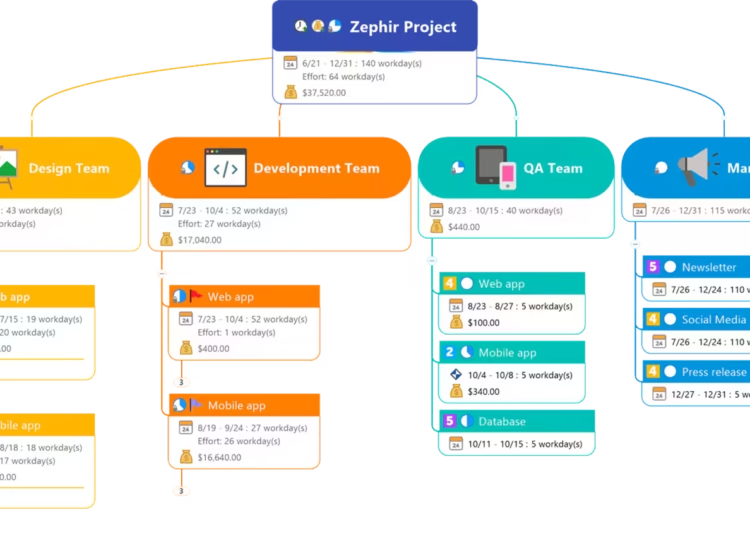
Struggling to turn abstract thoughts into clear action? A powerful visual mapping tool can bridge that gap. MindManager acts like a digital whiteboard for your mind.
It helps you brainstorm, plan strategically, and organize complex information. You can see connections and build structured plans from initial ideas.
Originally launched in 1998, MindManager has evolved significantly. It started as a Windows-only application. Today, it’s a multi-platform management solution available on macOS, mobile devices, and the web.
Its credibility is proven by a vast user community. Millions of individuals and teams rely on it globally. Major business leaders from various industries are among its clients.
This review will analyze its features, pricing, and usability. Our goal is to help you decide if its capabilities fit your needs for managing projects and enhancing team collaboration.
Key Takeaways
- Visual mapping software transforms brainstorming and planning into clear, actionable diagrams.
- MindManager serves as a digital hub for organizing complex information and strategic thinking.
- It has a long history, evolving from a single platform to a versatile, multi-device solution.
- Adoption by a large, global user base and major enterprises underscores its market position.
- This review provides a transactional analysis to help you evaluate if the software aligns with your personal or organizational goals.
What is MindManager? Core Features and Capabilities
At its core, MindManager transforms scattered ideas into structured visual diagrams. It provides a dynamic canvas for organizing thoughts and complex information. The platform moves beyond simple note-taking into a full visual workspace.
From Mind Maps to Comprehensive Project Visualization
The primary function is digital mind mapping. This technique digitally replicates the classic brainstorming method. It allows for unlimited expansion and reorganization of topics.
You start with a central idea and branch out. The tools let you add subtopics, images, and icons. This creates a clear hierarchy of thoughts and concepts.
The platform expands far beyond basic mind maps. It serves as a comprehensive visual workspace. You can build flowcharts, organizational charts, and detailed concept maps.
For project management, integrated Gantt chart views are a key feature. These charts visualize project timelines, dependencies, and milestones. You can track progress and adjust schedules directly within the visual map.
Key Tools for Brainstorming and Planning
Practical features support effective brainstorming and planning. Guided brainstorming sessions help teams generate ideas rapidly. You can capture every thought without losing structure.
Each topic on a mind map acts as a central information repository. You can attach documents, web links, images, and detailed notes directly to it. This keeps all relevant data connected and accessible.
MindManager includes powerful tools for execution. You can assign owners, due dates, and priorities to turn ideas into actionable task items. Built-in formulas allow for budget calculations right inside topic notes.
Visual indicators show project status and dependencies at a glance. This turns a planning document into a live dashboard. It supports the entire workflow from idea to review.
Integration and Collaboration Features
Static maps become dynamic team tools through integration. MindManager syncs data with popular productivity platforms like Microsoft Outlook and Slack. This enables real-time progress tracking across your organization.
MindManager supports co-editing and provides notifications for off-track items. Teams can collaborate on the same visual plan simultaneously. Integration with Microsoft Teams, SharePoint, and Jira connects visual planning with existing workflows.
An extensive template library offers structured starting points. These templates cover common business scenarios like risk management and training programs. They include placeholder information and example maps for guidance.
These collaboration features ensure that visual project management is a connected, team-wide activity. Mindmanager supports the shift from individual brainstorming to coordinated execution.
MindManager Plans and Pricing: Evaluating the Cost
The pricing model for a visual workspace platform can significantly impact your team’s budget and workflow. Understanding the available options is essential for making a smart investment. This breakdown covers the subscription tiers, one-time purchase, and trial to help you decide.

Essentials, Professional, and Enterprise Tiers
This visual software offers three primary subscription plans. The Essentials tier is the web-only version priced at $99 per year. It’s designed for individual users who need core mapping tools in a browser.
The Professional plan costs $179 annually. It includes the full desktop software for Windows and macOS. This tier supports small teams with collaboration for up to five users.
For larger organizations, the Enterprise plan is priced at $179 per user, per year. It requires a minimum of five seats. This business-focused option adds advanced administration, single sign-on (SSO), and dedicated support.
Understanding the One-Time Purchase Option
A perpetual license is a key alternative to annual subscriptions. You can buy MindManager outright for a single payment of $369. This one-time purchase covers the current desktop version for both Windows and macOS.
This option provides a fixed product without recurring fees. It is a cost-effective way for individuals or teams with stable needs. However, it may not include future major updates or cloud service access.
Comparing the long-term cost of a subscription versus a perpetual license is crucial. For some companies, the one-time fee offers better value over several years.
Is the Free 30-Day Trial Worth It?
Absolutely. The free trial provides full, unrestricted access to the Professional desktop version. You can test every feature for a full month without any cost.
This no-risk evaluation period is invaluable. It allows you to assess the tool’s fit for your management style and business projects. You can build complex maps and simulate team collaboration.
The trial helps justify the pricing by demonstrating potential productivity gains. It’s the best way to experience the software‘s advanced formatting and visualization options firsthand.
When evaluating cost, consider the return on investment. The premium pricing reflects a powerful product for complex visual management. For solo users or very small businesses, the cost may be a barrier.
For enterprise teams, the added value of centralized deployment and admin controls justifies the per-user fee. The Enterprise plan transforms the tool into a scalable company-wide solution.
Start with the free trial. Compare the web and desktop experiences. Then, project your costs over two to three years to choose between a subscription or the one-time purchase. This version of the platform offers flexible ways to access its capabilities.
Ease of Use: Navigating the MindManager Interface
For visual mapping software to deliver value, users must feel in control from the first click. The interface design and available support are critical for this. This section examines how the program performs in day-to-day operation.

A Familiar Ribbon-Based Design
MindManager adopts a look and feel that most office workers will recognize instantly. Its ribbon-based toolbar, with tabs like “Home” and “Insert,” mirrors Microsoft Office products. This deliberate design choice reduces initial friction for a vast number of users.
Core actions like adding topics or changing formats are intuitively accessible. The main canvas is a clean, expansive workspace. You can add and connect subtopics through simple drag-and-drop actions or right-click context menus.
A dynamic formatting panel gives you immediate control over your map‘s visual style. This workflow makes building the basic structure of your maps a straightforward process. The familiar interface lets you focus on your ideas, not on finding the right tool.
Templates and Onboarding for New Users
Starting with a blank page can be daunting. The extensive template library is a critical onboarding tool. It provides structured starting points for common business and management scenarios.
These templates include working, editable models of complex diagrams. They come with placeholder information and example data. This approach helps new users overcome hesitation by showing what’s possible.
It’s a practical place to begin learning the software‘s capabilities. You can deconstruct a finished project plan or brainstorming map to see how it was built. This hands-on method accelerates the learning process effectively.
Addressing the Learning Curve
Creating a basic visual map is simple. However, unlocking the program‘s full potential for advanced project management requires more time. Features like formula-based budgeting or intricate Gantt charting have a steeper learning curve.
Some versions of MindManager may display on-screen adverts, which some find intrusive. This is balanced by a robust in-app help system. It includes FAQs, quick tips, and keyboard shortcuts for power users.
Customer support is accessible via ticket, online chat, phone, or email. For new users, practical advice is key. Leverage the free trial period fully to experiment without pressure.
Start with templates, pay attention to pop-up tips, and focus on learning one advanced feature set at a time. This managed approach makes the learning process less overwhelming. The initial curve is mitigated by the familiar interface and supportive resources.
Overall, while mastery of all apps and features takes dedicated time, the look and workflow promote efficient long-term use. The software is designed to grow with your mind mapping and planning needs.
Conclusion: How MindManager Stacks Up in the Market
When evaluating tools for serious project management and brainstorming, few solutions offer the depth and recognition of this platform. Our review finds it is a powerful, feature-dense visualization software trusted to transform complex ideas into structured projects.
Its main strengths are unparalleled customization for diagrams, robust project management integrations, and effective collaboration tools. The professional interface is a major plus. Primary considerations are the premium pricing model and the time investment to master advanced capabilities.
This product often ranks above direct competitors. It stands out due to its business-centric design and depth of features. Industry awards and positive critical reviews are strong evidence of its quality and effectiveness.
The final verdict is clear. MindManager is a top-tier investment for professionals and teams where visual planning is critical. We strongly recommend taking full advantage of the comprehensive 30-day free trial to experience this tool firsthand.