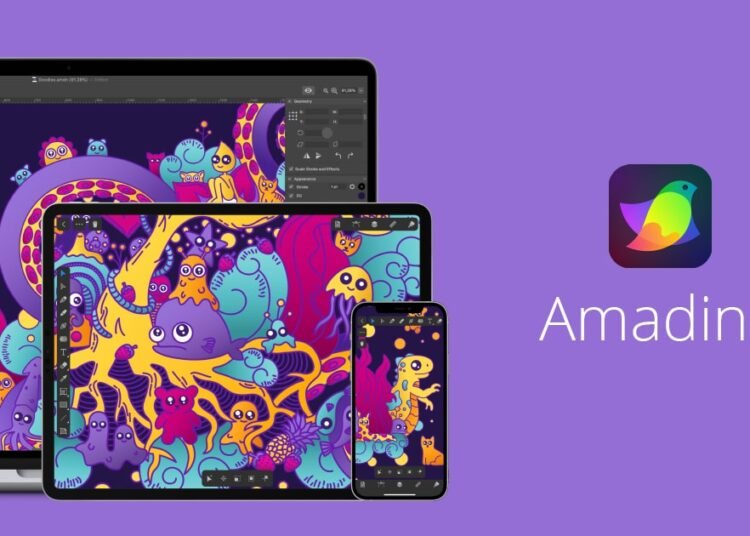
Amadine is vector design software for creating logos, icons, illustrations and marketing graphics through a simplified interface. It is sold as a one-time license rather than a monthly subscription, which makes it a practical option for people learning design or producing visual content on a limited budget.
Key features
- Vector drawing tools: Pen, shapes and paths for graphics that stay sharp at any size.
- Simplified interface: A gentler learning curve than heavy professional design suites.
- Layers and groups: To organize elements in larger projects.
- Multiple export formats: Such as SVG, PDF and PNG for web and print.
- One-time license: You pay for the app instead of a recurring subscription.
Pricing
Amadine is sold as a one-time license, with a trial so you can test it before buying. The price depends on the platform and the store you buy from, so check the current price on the official site.
Prices can change, so check Amadine’s official pricing page before you subscribe.
Pros and cons
| Pros | Cons |
|---|---|
| No monthly subscription | Fewer tools than the leading professional apps |
| Easier to learn than professional suites | Smaller community and tutorial library |
| Well suited to logos, icons and simple illustrations | Not built for photo editing |
Use cases
- Learning vector basics: Start with paths and shapes before moving to more complex software.
- Creating visual content: Icons and illustrations for your posts and articles with consistent quality.
- A small project’s visual identity: A logo and simple assets without an expensive subscription.
Who it’s best for
Learners, content creators and beginner designers who need simple vector design software without a monthly subscription.
Skip it if you work in a design team that standardizes on a specific professional suite, or if your main work is photo editing.
How to get started
Download the trial and design a simple icon or logo before buying the license.
FAQ
Is Amadine free? No. It offers a trial, then a one-time license.
Is it good for beginners? Yes. Its interface is simpler than many professional vector apps.
Can I use it for photo editing? No. It is built for vector graphics, not photo retouching.
Disclosure: al-khwarizmi may earn a commission if you sign up for Amadine through links in this article. This does not change the price you pay, and it does not influence which tools we cover.